Chelsea - Stamford Bridge

Chelsea - Stamford Bridge
Showing posts with label online identity. Show all posts

Sunday, May 18, 2014

#UOSM2008 Digital Portfolio - Summary

Before UOSM2008 I was already using social media. However, as it turned out, this use had little or no benefit to my future career. I’ve never blogged, had only ~10 tweets, my Facebook profile was for social life only and the LinkedIn was far from perfect. Below are given the online changes of my attitude and presentation divided into main topics.

Twitter (https://twitter.com/Eldar994)


During the module time, I’ve realized the true power of Twitter and started to target three categories of twitter accounts (Fig.1):
  • The module classmates/lecturers, for communication.
  • The companies I support and keep up-to-date with, and more specifically, CEOs of the companies, e.g. Microsoft, Apple, Intel, IBM, etc.
  • Job recruitment agencies, e.g. GraduateJobFeed.co.uk, ProspectsJobs, TargetJobs, etc.

Figure.1

I’ve published ~170 module related tweets (~1-2/day). Now I use the Twitter to share my posts and my LinkedIn updates. My about.me page is connected to Tweeter as well (Fig.2).


Figure.2

LinkedIn (uk.linkedin.com/pub/eldar-alasgarov/67/621/636/)


My LinkedIn profile had most changes as my online appearance. Firstly, I’ve customizing my Profile:  changed the picture, added my Twitter and Blog for communication (Fig.3).


Figure.3

Previously, I was targeting my friends. However, thanks to UOSM2008 I’ve started to target management structures of the companies I’m interested in and/or I‘ve applied for. In three months I’ve connected to more than 370 people, mostly IT professionals, Recruiters, and HRs of the world leading companies, e.g. IBM, Deloitte, Facebook, Siemens, etc. (Fig.4)


Figure.4

I’ve joined groups, both job search and IT related, in order to be up-to-date (Fig.5), and encouraged my friends to write recommendations (Fig.6).


Figure.5

Figure.6

After the upgrades, just in one week my profile was viewed by 50 people and I’ve shown up 32 times in search results in past 90 days (Fig.7).

Figure.7

Blogger


During blogging topics were discussed with the classmates via sharing and commenting on in each other’s posts. I’ve seen different styles of writing and presenting, different approaches and opinions on each topic. Based on classmates’ feedbacks, we were able to adjust and reconsider our opinion in the topics’ summary.


Figure.8

Both with posts and comments, I’ve written 11,041 words. For a non-native speaker, this is nothing but a good practice.


About.me (http://about.me/eldar.alasgarov/)


I’ve never used About.me and was quite surprised with the power and simplicity of it. It gathers all social networks known nowadays into one single page, which you can customize and add a summary. Previously, when exchanging contacts, I’d have to give separately the email/Facebook/Twitter/LinkedIn profiles. However, now I pass to people my About.me page which contains all information about me online. After improvements suggested by the classmates, Kim Fenton and Francesca Gerard (Fig.9), I’ve started to get hundreds of views on my profile every week! (Fig.10)


Figure.9


Figure.10

Topics


What about the topics covered in the module? Were they useful? Definitely, Yes! And here is a small list of the lessons learned (Fig.11):
  1. Categorization of people into “Digital Residents” and “Visitors” isn’t perfect. There are people who don’t fall under these categories.
  2. The amount of online identities you have doesn’t matter, what matters is how you manage them.
  3. Tips to build/improve your online identity.
  4. We are responsible for the actions performed online as much as in real live.
  5. People do have right to “Open Access”.


Figure.11

Future plans


As currently I haven’t decided on the market I want to focus on, UK or Azerbaijan, I’m currently targeting both and trying to expand my network as much as possible. Once decided, I will use all social media available to be in advantage against other applicants even before we meet our potential employer.

Word Count: 599


Tuesday, April 15, 2014

What is it about About.me?

After the experience with the first blog post (not an exercise related one), I have decided to write a second one and this time the trigger to the topic was another classmate’s post, Kimberly Fenton’s. As you might understand from the heading I’m writing about the About.me social network. I will be honest in saying that I have never even heard of it before I have been introduced in this module, #UOSM2008, and to be honest the first impression wasn't good. It has lots of similarities with other social networks, such as:
  • Similar to LinkedIn it sends everyday notifications of the people that have viewed your about.me page.
  • People can send each other notifications stating that they have “complimented” you and it is very similar to dating websites’ “Wink” button.
  • It also does provide a news feed and sends you a weekly updates and news.
  • Etc.
However, a question may arise in our heads, whether what does it differ About.me from others? What is special about it? There is one feature: it allows a user to connect all social networks related to a person, in one place. And I will be honest, this is quite an awesome idea (sorry my informal language). At times when we feel lost among this amount of social networks, at times when we even forget the usernames and passwords for every single one, and when we are struggling to keep the data up-to-date on all of them at the same time, this solution is just brilliant. However, for me personally, not the idea itself gives the interest in this social media, but the simplicity of presentation standing behind it. As you can see from the picture below, there are just a few lines of text summarizing yourself, basic contact information and self-explanatory icons that refer you to respective social network websites. Isn’t that simple?

And last but not least I want to mention one special icon that not everyone might be familiar with. It is the very last one in my list of social networks and I was quite surprised to see it there. It is the GitHub, and for those who don’t know it is a web-based hosting service for software development projects that uses the Git revision control system (https://github.com/). Basically, it is like a Dropbox, but for coding, and for me as an IT person it is everything. Just imagine that I can make my code public and share with anyone and everywhere.


After the actual creation of the About me page, a mutual feedback was given by two of our classmates, Kimberly Fenton and Francesca Gerard. Below you can see our conversion via Twitter:

Based on their feedback, following changes were implemented:The amount of text summarising my personality was reduced, in order to not to make it boring.
  • Telephone number as a contact details was removed, because of privacy concerns.
  • Words, such as “major” or “furthermore” were paraphrased to look more modern.
  • The font style for the heading (name and surname) was made a bit simpler and the content was proofread.
  • And finally, the background image was changed.
To view all the changes applied and the profile itself, please follow the link: http://about.me/eldar.alasgarov  


Sunday, April 13, 2014

"Sign Up or Connect with Facebook"

One of our classmates’, Tim Hodgkins’, comment on my first blog post have triggered me to write this post. In his comment, Tim has mentioned that by using one online profile you can not only use it within one social media, but also use it to sign up for different applications and software. I have agreed with his point, but by that time I wasn't quite focused on it. Recently, however, throughout my development in the area of social media, thanks to our module, I have realized the true power of any single social media. To make it completely clear for a reader, I’m speaking about the moment when you have accessed a website or an app and they ask you to Sign Up OR, which is more important, to Log In using your current social network details, e.g. Facebook, Google+, Twitter. Just for the sake of curiosity, I have decided to search for this kind of applications that allow Log In via social media profile and as my bases I have focused mostly on Facebook. My choice is not surprising as 51% of sites and apps prefer Facebook as a social login (Picture and Reference are provided below).


The results were just unbelievable as there were more than 2 million results for the search request “Sign Up or Login via Facebook”. After the fifth page of search results my tabs in the browser were full of examples and I've decided to stop as it started to get meaningless. Here are the most popular (in my opinion) examples of the websites and app that allow a Facebook Login as a Sign Up:
  1. Instagram (http://instagram.com/) – obviously, as it is part of the Facebook it is not a surprise that it allows Sign Up via Facebook.
  2. Netflix (https://www.netflix.com/Login?locale=en-GB) A huge American Internet on-demand provider with millions of subscribers.
  3. Prezi (https://prezi.com/) A very powerful online and desktop presentation creation tool. There is nothing to be compared with normal PowerPoint slides. This is just a whole new level.
  4. Spotify (https://www.spotify.com/uk/login/) a commercial music streaming service which has direct interaction with record labels, such as Sony.
  5. Yahoo(https://help.yahoo.com/kb/groups/sign-facebook-google-account-sln2077.html?impressions=true) Sounds weird, but yes, you can log in to Yahoo using your Facebook or Google account.
  6. About.me (https://about.me/login) Another social network which I have discovered. Gathers in itself all possible social networks related to one person.
  7. Stackoverflow (https://stackoverflow.com/users/signup) – Not everyone might know, but the StackOverFlow website is the second home for any kind of developer (programmer) in the world. Whenever a developer has an issue, he/she doesn't go to YouTube, Google or Books, they go to stackoverflow.com.
  8. Vimeo (https://vimeo.com/log_in) – Another quite famous video-sharing website, which has quite a lot of similarities with the YouTube.
  9. Slideshare (https://www.slideshare.net/login) As it can be understood from its name, it is a slide sharing website, which contains in itself public slides that are uploaded all around the world.
  10. Pinterest (https://www.pinterest.com/login/) is a visual discovery tool that people use to collect ideas for their different projects and interests” (http://en.wikipedia.org/wiki/Pinterest). Even Wikipedia gives a better explanation than I do.

And these are just a drop in the ocean of the websites and apps that allow this kind of Sign Ups. However, it is time to state that there are two sides of this kind of online facilities. On one side, you are saving tons of your personal time on everyday Sign Up pages, which are annoying. However, on the other side, you allow a complete access to your profile to the app. They have not only the access to your profile, but even the permission to post news on your behalf. The limit till which you consider to allow this kind of things is up to a user, and only he/she can decide on it. Every person has his/her level of privacy. Personally, I use my fake online Facebook profile, just in case J.

Saturday, March 8, 2014

#UOSM2008:Topic 3 Building your Online Professional Profile

"Discuss the ways in which an authentic online professional profile can be developed"

In the modern world, when our everyday life becomes more and more online, the recruitment sector and employers are not the last people who are using online facilities. On the contrary, they have taken the recruitment to the whole new level where there is no need any more to carry your paper CV with you. However, as a person who has joined this trend around three years ago I had two main questions: Why do you need an authentic online professional profile? And, how do you develop one? In this post, I will answer both of these questions based on the research and my personal experience.

Why do you need an authentic online professional profile? For example, “LinkedIn”:

  • Well, the first answer could be: Why not? It is not very time consuming, it is accessible to everyone in every language, it is nearly always for free (unless you want to upgrade your LinkedIn) and you also can have your small portion of data on the Internet in this age of online information overload.
  • It is easier to find a job, internship, placement, etc. My close friend, a young web developer, has received two job offers via LinkedIn. The point is, he haven't even apply, as they have found him by themselves.
  • According to the studies, 75% of HR department are checking their applicants online and 50% of them say that it influences their decision (Microsoft, 2013). Not having an online profile will cause more questions than answers.

How you develop an online profile:
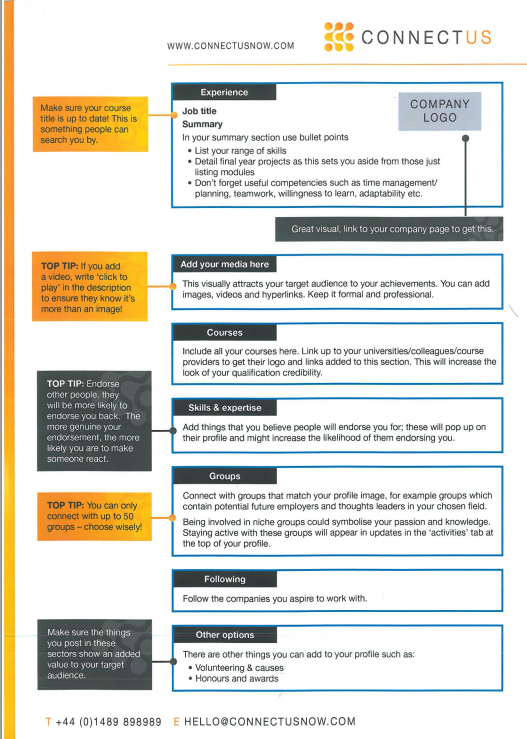
Better than my words could be just the explanation via picture. Posted below are the pictures that I have scanned from the paper given to me on the Carriers Fair held at the University of Southampton, by ConnectUs recruitment consultancy. However, I will still point out the most important parts of it, in my opinion:
  • Have a professional photo. As most of the HRs deliberately do not want a photo on the CV, an online identity with your photo is the only way they can see you. Remember that the first impression is very important (Hyams, 2012).
  • Have at least two or three references that have the most amount of positive feedback about you (Hyams, 2012).
  • Whatever you are writing, keep it short and sweet, and obviously provide the keywords that you think describe you and are searched by the employers.
  • Join groups, both on local and international level. Just creating a profile is not enough, join the discussions, share links and news, increase the number of connections and just stand up of the crowd (Direct Connection, Advertising & Marketing, LLC, 2013).


And finally, don’t just copy your paper CV, but give a bit more information about yourself, your strengths and weaknesses, interests, etc. In LinkedIn you are not limited to two pages of paper as it is in the real world (Guardian News and Media Limited, 2013).

Last but not least, just a quick advice for the post readers: be as authentic and correct as possible in showing your identity! We all have to accept that during the creation of our own profiles, both online and on paper, we often do embellish a little bit the stories about us. It is completely normal, but to the some extend. I personally do remember that on my first CV I have specified various programming languages that I have pleasure to code in without specifying the degree of knowledge for each. I had a very unpleasant situation when during one of the telephone interviews I was asked the very deep questions of one of the programming languages I have specified, that was quite a lesson for me.

Word Count: 620

References

Direct Connection, Advertising & Marketing, LLC, 2013. Four More LinkedIn Hacks for Insurance Wholesalers. [Online] Available at: http://www.webdcmarketing.com/2013/11/four-more-linkedin-hacks-for-insurance-wholesalers/ [Accessed 8 March 2014].

Guardian News and Media Limited, 2013. Why online CVs are essential in your job search. [Online] Available at: http://jobs.theguardian.com/article/4290335/why-online-cvs-are-essential-in-your-job-search/ [Accessed 7 March 2014].

Hyams, C., 2012. Personal Branding on LinkedIn: 10 Mistakes to Avoid. [Online] Available at: http://www.jeffbullas.com/2012/11/09/personal-branding-on-linkedin-10-mistakes-to-avoid/#WByq6jGKiFd0UI49.99 [Accessed 7 March 2014].

Microsoft, 2013. Online Safety Research. [Online] Available at: http://www.microsoft.com/security/resources/research.aspx#reputation [Accessed 7 March 2014].

Sunday, March 2, 2014

#UOSM2008 Topic 2 - Reflective Summary


It is time to summarize the second Topic of the module Living and Working on the Web. The first thing to be mentioned is my mistake of misunderstanding the topic’s question (thanks to George Chiverton for pointing at it). The question was to describe the pros and cons of having more than one online identity, when I have gone a bit differently by explaining the pros and cons of just having an online identity. Having read others comments and blogs I have came up with the following notes:

·     Online identities help you to communicate with others, share information in real time and helps to develop your personal employability (Cosmato, 2013).

·    However, it also reduces a very valuable face-to-face interaction between people, takes a significant amount of your personal time (Cosmato, 2013) and increases a possibility of identity fraud (Ibraz, 2010), which as I've later read from the blog of our classmate, Joy Isaac, it is referred as “Catfishing”.
·  Furthermore, quite interesting was the blog of our classmates, Alysia Wildman. The differentiation between Anonymity and Authenticity is quite important, as the former depends on a user and could be performed in various ways, via a specific software or just frauding your identity, and the latter “creates an online version of your life that relies on your true identity in order to function” (Masters, 2011).

To sum up, I just want to repeat that, despite disagreeing with this trend, I do have more than one online identity in order to be aware of all events and let others get in touch with me, especially when you are studying abroad. After the research on this topic both online and within myself, I have came to the opinion that it doesn't matter at all how many online identities do you have and in which social networks. The thing that does matter is how wisely and purposefully you use it.  

“Your entire life is online, and it can be used against you. Be vigilant!”


References

Cosmato, D., 2013. Love to know social networking. [Online] Available at: http://socialnetworking.lovetoknow.com/Advantages_and_Disadvantages_of_Social_Networking [Accessed 22 February 2014].
Ibraz, A., 2010. Fundamentals of Computing. [Online] Available at: http://mason.gmu.edu/~aibraz/disadvantages.html [Accessed 22 February 2014].
Masters, A., 2011. The Independent. [Online] Available at: http://blogs.independent.co.uk/2011/09/19/identity-on-the-internet-the-pros-and-cons-of-anonymity/ [Accessed 2 February 2014].